
Overview
ShareCARD uses a credit-based billing system. Organizations purchase credits and use them to activate users (Admins and Agents) and generate cards. Credits are deducted based on specific actions and remain in the organization’s wallet until they are used.
This approach gives organizations flexibility to control spending, activate users only when needed, and scale usage based on available credits.
Credit-Based Pricing Model
| Action | Credit Cost | Cost in USD | Billing Type |
|---|---|---|---|
| Admin activation | 5 credits | $5 / month | Recurring (monthly activation) |
| Agent activation | 15 credits | $15 / month | Recurring (monthly activation) |
| Card generation | 0.05 credits | $0.05 | One-off payment |
Note: 1 credit = $1 USD
Purchasing Credits
Organizations must first purchase credits before activating users or generating cards.
How to Buy Credits
- From the Main Menu, tap Credits History
- Tap Wallet Balance
- Enter the amount of money worth the credits you want to purchase
- Payments can be made in USD or UGX
- UGX payments are automatically converted to USD
- Proceed to payment
- Once payment is successful, the equivalent number of credits is added to your wallet
Using Credits
Credits in the wallet can be used to:
- Activate Admins
- Activate Agents
- Generate Cards
Unused credits remain in the wallet until they are spent.
Examples of Credit Usage
Example 1: $20 Credit Purchase
- Organization buys $20 worth of credits → 20 credits
- Possible usage:
- Activate 1 Admin (5 credits)
- Activate 1 Agent (15 credits)
This fully utilizes the 20 credits for one month.
If the organization attempts to generate cards and does not have enough credits:
- They will be prompted to buy additional credits
- Card generation cost = Number of cards × 0.05 credits
Example 2: $100 Credit Purchase
- Organization buys $100 worth of credits → 100 credits
- They activate:
- 2 Agents → 30 credits
- 1 Admin → 5 credits
- Total used → 35 credits
Remaining balance:
- 65 credits remain in the wallet
The remaining credits can be used later to:
- Re-activate users in future months
- Activate additional Admins or Agents
- Generate more cards
Credits do not expire and remain available until used.
Activating Users
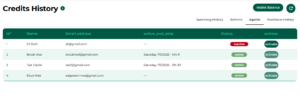
Activating an Agent
- From the Main Menu, tap Credits History
- Open the Agents tab
- View the list of inactive agents
- Tap Activate next to the agent
- 15 credits are deducted from the wallet
Result:
- The agent is activated for one month
- At the end of the month, the agent must be re-activated using available credits
- If no activation is done, credits remain untouched in the wallet
Activating an Admin
- From the Credits History section
- Tap the Admins horizontal tab
- View the list of inactive admins
- Tap Activate in the Actions column
Credit Deduction:
- 5 credits per admin
- Example:
- Activating 1 admin → 5 credits deducted
- Activating 2 admins → 10 credits deducted
Result:
- Admin(s) are activated for one month
- Monthly re-activation is required
- If not re-activated, credits remain in the wallet
Card Generation
- Card generation costs 0.05 credits per card
- This is a one-off payment
- If the wallet does not have enough credits:
- The system prompts the user to purchase additional credits
How to Generate Cards
Organizations can generate cards directly from the platform using available credits in their wallet.
Steps to Generate Cards
- From the Main Menu, tap Cards
- Tap Generate Cards
- Enter the number of cards you would like to generate
- Ensure you have enough credits
- Required credits = Number of cards × 0.05
- Tap Generate Cards to proceed
What Happens Next
- Once the cards are successfully generated:
- The appropriate number of credits is automatically deducted from the wallet
- If the wallet does not have sufficient credits:
- The user is prompted to purchase more credits before proceeding
Tracking Credit Usage
Spending History
To see how credits are being utilized:
- Tap the Spending History horizontal tab
This view shows:
- Type of action performed (Admin activation, Agent activation, Card generation)
- Date the action occurred
- Number of credits deducted
Purchase History
To view successful credit purchases:
- Tap the Purchase History tab
This section displays:
- Number of credits purchased
- Purchase date
- Amount paid
- Payment method used
Key Notes & Behavior
- Credits are deducted only when an action is performed
- Credits do not expire
- User activations are monthly, not automatic renewals
- If no activation is done, credits remain safely in the wallet
- Organizations have full control over when and how credits are spent